Prices on request. Stock and final specifications are confirmed in your written quote.
Branches in Jakarta, Bandung and Yogyakarta, delivering across Indonesia

Home / Solutions

Solutions

A starting configuration for each kind of work, with the parts that matter most for it. Every one opens in the configurator, where you can change any part before we quote.

Colour grading on a calibrated display

Media and entertainment

Photo and video editing, 3D, live production, real-time engines and rendering

Photo and video editing

Photo editing leans on the processor and on enough memory for large files and many layers. Video editing mixes CPU and GPU load: decoding camera files, effects and noise reduction lean on the graphics card, while timeline responsiveness and exports depend on the processor. Fast storage keeps both smooth.

Typical software

  • Adobe Photoshop Retouching, compositing

  • Adobe Lightroom Classic Catalog, batch export

  • Capture One Tethered, RAW
  • Stable Diffusion Generative fill
  • DaVinci Resolve Editing, color, Fusion
  • Adobe Premiere Pro Editing
  • Adobe After Effects Motion graphics
  • Foundry Nuke Compositing

What matters

Graphics
Critical
Resolve leans on the GPU for effects, noise reduction and smooth playback. Photo work needs only a mid-range card with enough video memory.
Processor
Critical
Fast cores speed up Photoshop filters, Lightroom exports and the video timeline. Intel Core Ultra adds Quick Sync hardware decoding for H.264 and H.265.
Memory
Important
64 GB is a sensible start for 4K video. Large panoramas and layered photo files also fill memory quickly.
Storage
Critical
Fast NVMe drives for media, catalog and cache, plus a larger drive for the archive. Slow storage causes dropped frames.

3D design and animation

Modeling, sculpting and animation in the viewport mostly use a few fast CPU cores and a strong graphics card. Heavy simulations and final renders can use many more cores, which is when a larger platform pays off.

Typical software

  • Blender 3D, rendering
  • Autodesk Maya Animation
  • Autodesk 3ds Max Modeling
  • Cinema 4D Motion design
  • Houdini FX
  • ZBrush Sculpting

What matters

Processor
Important
Viewport work and animation rigs depend on single-core speed. Simulation and baking use many cores.
Graphics
Critical
A fast GPU keeps large scenes smooth in the viewport. Video memory limits scene size.
Memory
Important
64 GB covers most scenes. Detailed simulations and textures can use much more.
Storage
Supporting
NVMe for projects and caches. Capacity matters more than peak speed.

Live production and real-time engines

Both draw and mix every frame live. Live mixing has to keep running without a dropped frame, with every camera input decoded and composited in real time while recording and streaming run alongside. Game engines and virtual production draw each frame too, so the graphics card sets the quality you can work at.

Typical software

  • vMix Mixing, replay
  • OBS Studio Streaming
  • Live streaming encoders H.264, H.265
  • Unreal Engine Real-time, virtual production
  • Unity Game development
  • Twinmotion Real-time visualization

What matters

Graphics
Critical
The GPU sets frame rate and quality in the editor, and handles scaling, overlays and hardware encoding for streaming. Ray tracing and large worlds also need video memory.
Processor
Critical
Each live input and encode uses CPU time, and fast cores shorten code and shader compiles. Intel Core Ultra adds Quick Sync hardware decoding and encoding.
Memory
Important
Enough for multiple inputs, replay buffers and large projects. 64 GB is a comfortable start.
Storage
Critical
Fast NVMe drives for recording several streams at once, and for the project and shader cache. Capture cards use PCIe slots.

Rendering

Final-quality renders can run on the processor, on graphics cards, or both, depending on the renderer. CPU renderers keep getting faster with every extra core. GPU renderers scale with the number of cards, and their video memory limits scene size.

Typical software

  • Blender Cycles CPU or GPU
  • V-Ray CPU or GPU
  • Redshift GPU
  • OctaneRender GPU
  • Cinema 4D CPU or GPU
  • KeyShot CPU or GPU

What matters

Graphics
Critical
GPU renderers scale with GPU speed and count. GPU memory limits how large a scene can be.
Processor
Important
Critical for CPU renderers, which scale with core count. Less so for GPU rendering.
Memory
Important
64 to 128 GB for detailed scenes, simulations and textures.
Storage
Supporting
NVMe for assets and caches. Capacity matters more than peak speed.
Workstation interior with tower cooler and graphics card

Engineering and architecture

CAD, visualization and photogrammetry

Architecture and CAD

Most modeling and drafting runs on a single processor core, so clock speed matters more than core count. A professional workstation graphics card gives driver stability for large assemblies.

Typical software

  • SolidWorks CAD
  • Autodesk Revit BIM
  • AutoCAD CAD
  • Autodesk Inventor CAD
  • Rhino Modeling
  • Ansys Simulation

What matters

Processor
Critical
Most modeling work runs on one core, so clock speed matters more than core count.
Graphics
Important
A certified professional GPU for driver stability. A mid-range card is usually enough.
Memory
Supporting
32 to 64 GB covers most assemblies and models.
Storage
Supporting
NVMe for fast file opening and saving.

Visualization

Real-time visualization tools draw architectural scenes live, so the graphics card does most of the work. Large models and textures also want video memory and system memory.

Typical software

  • Twinmotion Real-time visualization
  • Lumion Architecture
  • Enscape Revit, Rhino plug-in
  • D5 Render Real-time ray tracing
  • KeyShot Product rendering

What matters

Graphics
Critical
The GPU sets quality and frame rate. Video memory limits how detailed a scene can be.
Processor
Important
Good single-core speed for modeling and scene preparation.
Memory
Important
Detailed scenes with many textures use memory quickly.
Storage
Supporting
NVMe for project files and asset libraries.

Photogrammetry and GIS

Turning thousands of photos into 3D models stresses the processor in some steps and the graphics card in others, and uses a great deal of memory. Maps and large datasets in GIS are heavy on storage and memory.

Typical software

  • Agisoft Metashape Photogrammetry
  • RealityScan Photogrammetry
  • PIX4D Drone mapping
  • ArcGIS Pro GIS

What matters

Graphics
Critical
Dense-cloud and mesh steps run on the GPU. More video memory handles larger photo sets.
Processor
Important
Alignment and meshing use the processor. Good speed and a solid core count help.
Memory
Critical
Large photo sets and point clouds need a lot of memory.
Storage
Important
Fast NVMe for working data, plus capacity for image sets.
Professional blower-style graphics card

AI and science

AI development and scientific computing

AI development and scientific computing

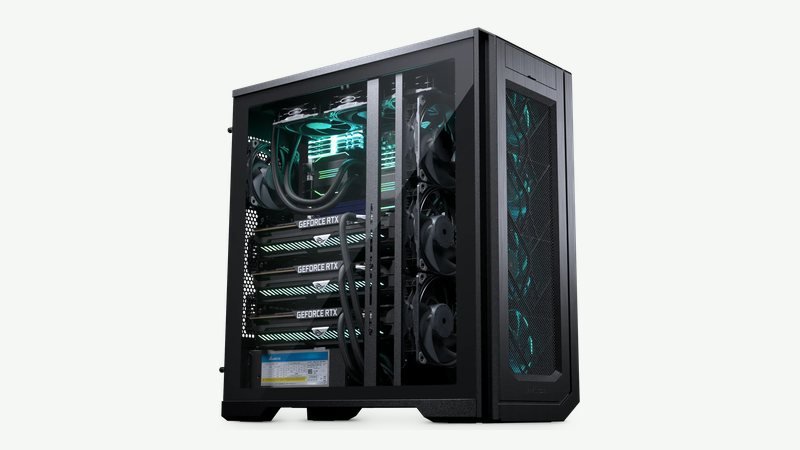
Running and training models is decided by graphics-card memory first: several cards at full PCIe speed let larger models fit. Scientific and numerical work scales with core count and memory bandwidth, and model size is limited by memory. System memory should be at least the size of the total video memory.

Typical software

  • PyTorch Training
  • Hugging Face Models
  • llama.cpp and Ollama Local LLMs
  • ComfyUI Image generation
  • MATLAB Analysis
  • Python data science Analysis
  • Ansys Simulation
  • Virtualization Proxmox, VMware

What matters

Graphics
Critical
GPU memory decides which models fit, and several GPUs let you run larger ones. Only some solvers use the GPU, so we check yours first.
Memory
Critical
System memory of at least your total GPU memory, ideally twice that. Large meshes may need 256 GB or more.
Processor
Critical
Solvers scale with core count and memory bandwidth, where Threadripper PRO helps. For AI work it mainly feeds the GPUs, so PCIe lanes matter more than raw speed.
Storage
Important
Large NVMe drives, since models and datasets fill space quickly, plus fast scratch space for solver files.